What you’ll learn:
What character is right for the Rig
preparing the character for a professional Rig
Using The expression for rigging
Rigging the different views of the character
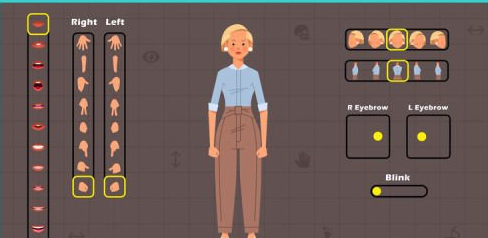
Creating the hand states for the character
Creating the Mouth states for Lip Sync animation
Rigging eyes and eyebrows
Controlling the Character Components by Sliders
Import the rigged character in different scenes
Requirements:
You should familiar with After Effects But Don’t need any knowledge about rigging
Description:
Hi there, you all have been probably offered a project in which you need to rig and animate the character?
but because you think the rig and animating a character is very hard and you’re not able to do it, you reject the offer and you don’t even go for it.
Or maybe many times you wanted to solve this problem and once for all learn how to rig all character parts and expressions which are needed in this context and make yourself needless in this field.
But the big problem is that most tutorials rig and animate the character from one pose but most of the projects we get offered are not like that and the character should be animated and rigged from different poses.
But all of the motion designers that don’t have all these skills together, especially when they are beginners and they are kind of amateur.
The first goal of this course is that you can download the character you like from freepik or any other website with the least information about designing a character. Improve its poses completely for a professional rig so you won’t have any problem while animating it.
In the continue, you learn how to rig your character fast and simple by duik script and control all poses of your character just by one skeleton and don’t need to rig and skeletonize for different poses again.
You learn how to control poses of your character by slider.
How to create different states for your character hand.
How to create mouth states and control them by slider and be able to create lip sync animation.
How to rig the eyes and eyebrows.